Cybersecurity Exemplars and skills learned

⬇️⬇️⬇️⬇️⬇️

Join tables in SQL

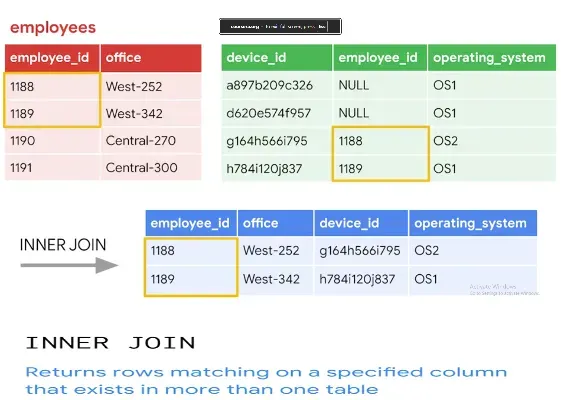
In the Join tables in SQL portion of the Linux and SQL module, I learned how SQL joins allow analysts to combine information from multiple tables to uncover relationships that aren’t visible when looking at a single dataset. This is especially important in cybersecurity, where data is often spread across different logs, systems, and monitoring tools. 🔑 Why Joins Matter Many databases store related information in separate tables. For example, an employees table might list employee IDs and names, while a machines table might list machine IDs and the employee responsible for each device. A join lets you merge these tables based on a shared column—such as employee_id—to produce a unified view of the data. This is essential for tasks like: Identifying which employee is associated with a compromised machine Linking login activity to specific users Connecting alerts to the systems they originated from 🔍 INNER JOIN: The Core Concept The lesson focused heavily on INNER JOIN , which returns only the rows where both tables have matching values in the join column. I learned that: You specify the first table in the FROM clause You use INNER JOIN to bring in the second table You define the relationship using ON table1.column = table2.column This produces a result set containing only the rows where the shared column matches in both tables . For example, if both tables contain employee IDs 1188 and 1189, those are the only rows that appear in the final output. 🧠 Understanding the Logic Behind Joins The course broke down the join process visually by showing a small subset of rows from each table. This helped reinforce that: Joins don’t add or remove data arbitrarily—they follow strict matching rules If a value exists in one table but not the other, it won’t appear in an INNER JOIN result The final output includes all columns from both tables for the matched rows This is extremely useful for cybersecurity investigations, where precision matters. 🛠️ Writing a Join Query I practiced writing join queries using syntax like: SELECT * FROM employees INNER JOIN machines ON employees.employee_id = machines.employee_id; This structure is the foundation for more advanced joins and multi-table analysis. 📈 How This Applies to Cybersecurity Work Joins are used constantly in security operations, including: Mapping suspicious machine activity back to the responsible user Combining authentication logs with device inventories Linking alerts to user accounts, departments, or physical locations Building complete incident timelines from fragmented data sources Learning how to join tables effectively means I can extract more meaningful insights from SQL databases and perform deeper investigations. Summary By completing the Join tables in SQL section, I gained a solid understanding of how SQL joins—especially INNER JOIN—allow me to combine related data across tables. This skill is essential for cybersecurity analysis, enabling me to correlate events, identify responsible users, and build accurate incident narratives from structured data.
• Understanding Network Hardening & Monitoring

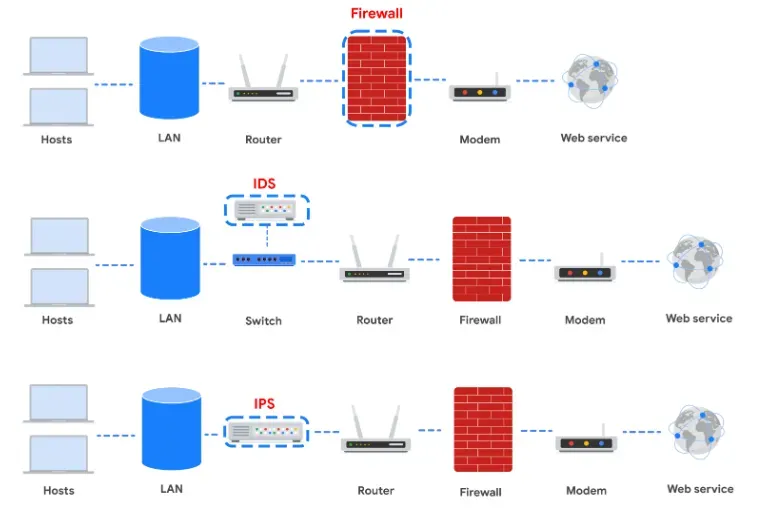
I learned how network hardening works by adding multiple layers of security, a strategy known as defense in depth . Each tool or device strengthens the network and reduces the chances of successful attacks. I learned the purpose and function of four major network security components: Firewalls: They filter traffic based on rules, inspecting packet headers (and payloads in NGFWs) to allow or block connections. Every system should have its own firewall. Intrusion Detection Systems (IDS): IDS tools monitor network activity and alert administrators when they detect signatures of known attacks or suspicious anomalies. They don’t block traffic; they only notify analysts. Intrusion Prevention Systems (IPS): IPS devices actively block malicious traffic. They detect signatures and anomalies, then drop packets or block senders. Because they sit inline, a failure can disrupt connectivity. Security Information and Event Management (SIEM): SIEM tools collect logs from across the network—firewalls, IDS, IPS, VPNs, proxies, DNS—and centralize them into one dashboard. They provide real‑time monitoring and help analysts identify suspicious activity. I also learned how full packet capture devices support investigations by recording all network traffic, which helps validate IDS alerts. Overall, I gained an understanding of how these tools fit into network architecture, how they complement each other, and how security analysts use them together to detect, monitor, and respond to threats. I also learned that organizations must balance cost, risk, and staffing when deciding which tools to deploy.

Exemplar: Apply OS hardening technique

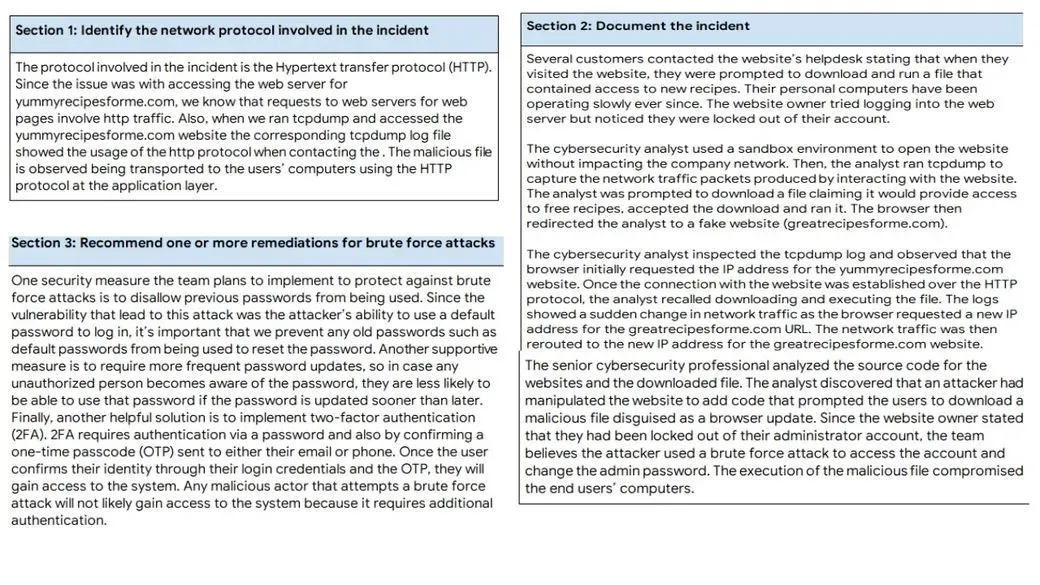
In this exemplar, I review a sample system configuration and demonstrate how to apply OS hardening techniques to strengthen security. The scenario provided comes from a Google sample activity where numerous security controls were misconfigured, missing, or implemented incorrectly , making it an ideal case study for identifying weaknesses and applying proper remediation. You can read or download the image/visa screenshot above to see the exact configuration I analyzed, along with my recommendations for each issue found. I focus on: Detecting weak or missing authentication and authorization controls Identifying improper file permissions and correcting them Disabling unnecessary or risky services and background processes Applying least‑privilege principles to user accounts and groups Strengthening logging, auditing, and monitoring Enforcing secure configuration baselines across the operating system This exemplar demonstrates my ability to evaluate a real-world system, pinpoint vulnerabilities, and apply structured hardening techniques to reduce the attack surface. By walking through each misconfiguration and explaining the fix, I show how OS hardening directly improves system integrity and resilience. It reflects my understanding of practical cybersecurity fundamentals: analyzing weaknesses, applying remediation steps, and validating that the hardened configuration meets security expectations.

Apply Filters to SQL Queries Exemplar

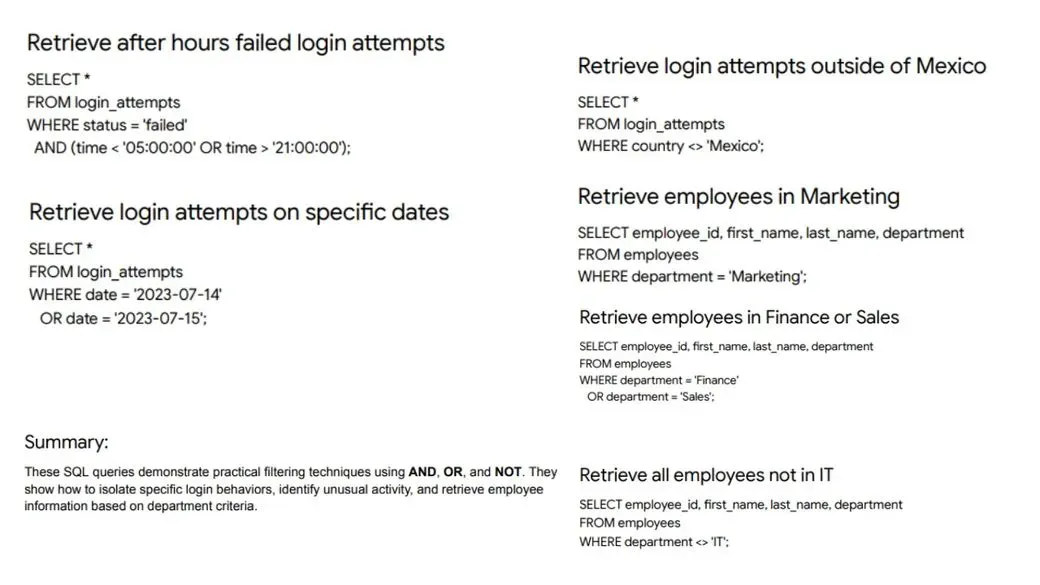
In this exemplar, I demonstrate my ability to work with SQL to extract meaningful insights from structured data. The focus is on writing clear, efficient queries that filter, sort, and combine information using real‑world logic. I showcase how to: Use SELECT statements to retrieve targeted data Apply WHERE filters with AND , OR , and NOT to refine results Work with comparison operators to isolate specific conditions Sort and organize output using ORDER BY Combine multiple criteria to answer practical business questions This example highlights my understanding of how SQL is used in everyday analysis — turning raw tables into usable information. Whether it’s filtering customer records, identifying trends, or narrowing down datasets for further processing, I’m comfortable writing queries that are both readable and effective. SQL is one of the core tools I use when working with data, and this exemplar reflects my ability to think logically, structure queries properly, and produce accurate results.