How to Track Holiday Gifts from Selection to Distribution
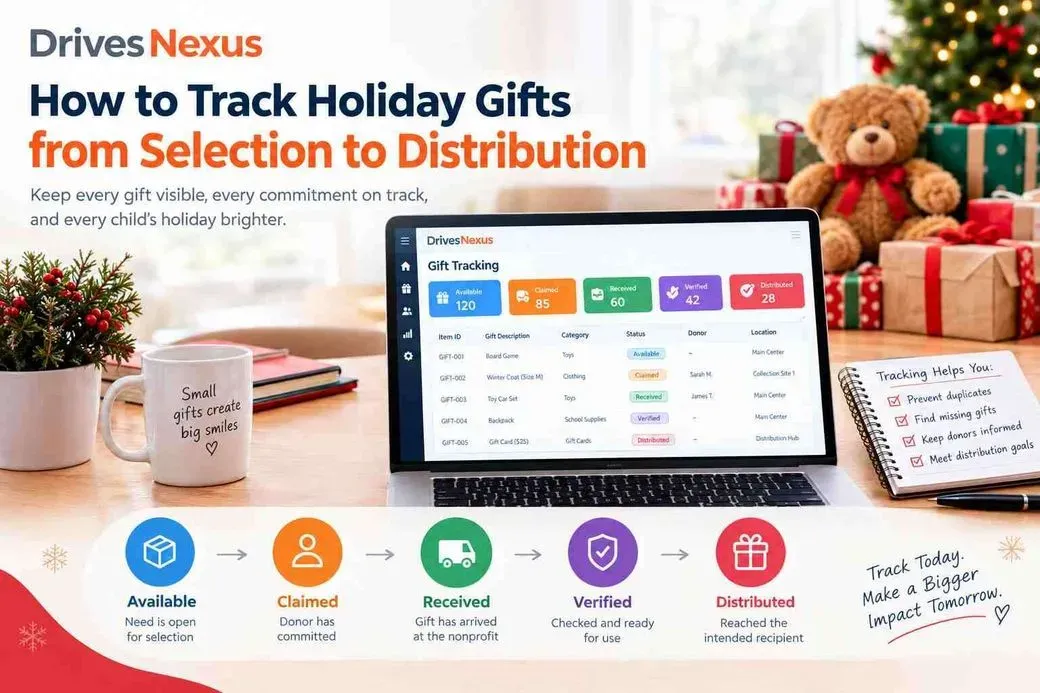
Tracking holiday gifts is one of the most important parts of running an organized donation drive. A nonprofit may have hundreds of requested gifts, multiple donors, volunteers, collection locations, and distribution deadlines. Without a clear tracking process, it can become difficult to know which gifts are still available, which have been promised, which have actually arrived, and which are ready to distribute.
The solution is not simply to record more information. The important part is giving every gift a clear status that reflects what has actually happened. A well-structured holiday gift drive management process helps nonprofit teams keep track of each gift from donor commitment through final distribution.
A practical holiday gift tracking workflow is:
Available → Claimed → Received → Verified → Distributed
Each stage provides different information to the nonprofit team.
Start with One Record for Every Gift Need
Before tracking donations, create one authoritative record for every exact gift request or category target.
An exact gift may have information such as:
Program ID
Recipient or family ID
Unique item ID
Gift category
Specific description
Age range
Size, when applicable
Priority
Quantity
Delivery deadline
Current status
For example, instead of recording only “toy,” an organization might have a specific record for a board game intended for a particular age range.
Every exact gift should have its own unique identifier. That identifier can follow the item through donor selection, confirmation, labeling, collection, check-in, sorting, and distribution.
This becomes especially useful when many similar gifts are being collected.
1. Available: The Gift Can Still Be Selected
An Available gift is an open need that has not yet been claimed by a donor.
This status tells staff and donors what still needs support.
For category-based drives, the same concept can apply to quantities. For example, an organization may need 50 board games but have received only 21.
The tracking record should show the target quantity, claimed quantity, received quantity, and remaining need.
This gives the team a more useful picture than simply counting total donations.
2. Claimed: A Donor Has Committed
Once a donor commits to providing a gift, its status should change to Claimed.
This is an important distinction:
Claimed does not mean received.
A claimed gift represents a donor commitment. The physical donation may still be days away — or it may never arrive.
The status should therefore remove the gift from the available pool while keeping it visible to staff for follow-up.
A controlled donor-selection process also helps prevent another donor from selecting the same item.
3. Received: The Physical Gift Has Arrived
A gift becomes Received only after it physically reaches the nonprofit or an approved collection location.
This status confirms that the organization has the donation in its possession.
The team should record information such as:
Date received
Collection location
Gift or item ID
Donor or confirmation reference
Package number, when applicable
This distinction becomes particularly important when multiple collection locations are involved.
A gift sitting at a partner location should not appear completely missing simply because it has not yet reached the main facility.
4. Verified: The Donation Matches the Requirement
Receiving a gift does not automatically mean the donation is ready for distribution.
The Verified stage confirms that the received item can actually be used as intended.
Staff or volunteers may need to check:
Correct item
Correct size
Quantity
Condition
Recipient assignment
Required components
Proper identification
For example, a donor may deliver a winter coat, but the coat could be the wrong size. It has been received, but it has not yet satisfied the original requirement.
Keeping Received and Verified separate helps the team identify these issues before distribution day.
5. Distributed: The Gift Has Completed the Workflow
Once the gift has been verified and delivered through the nonprofit’s distribution process, it can be marked Distributed.
At this stage, the organization should be able to determine that the gift has completed its intended journey.
This final status also supports reporting after the drive.
Why One Generic “Donated” Status Is Not Enough
A single status such as “Donated” can create confusion.
Does it mean a donor selected the item?
Did the donor confirm?
Has the gift arrived?
Has someone checked it?
Is it ready for distribution?
Has it already been distributed?
These are different operational events.
Separating the statuses gives program staff a clearer view of what requires action.
Use Unique IDs to Connect Digital and Physical Tracking
A unique item ID can connect the digital record to the physical gift.
For example:
GIFT-2026–00481
That identifier can appear on the donor confirmation, printable gift label, collection record, check-in process, and distribution record.
This is more reliable than identifying an item only by a description such as “blue coat,” especially when a drive contains many similar donations.
Monitor Exceptions, Not Just Totals
A drive can show a large number of collected gifts while still having important unmet needs.
Instead of looking only at total donations, teams should monitor:
Available needs
Claimed gifts
Received gifts
Verified gifts
Overdue commitments
Replacement needs
Gifts received without identification
Incorrect gifts
Recipient or category gaps
This helps staff focus on situations that require action.
For example, a drive might appear highly successful overall while one age group or category remains significantly under-supported.
Keep the Tracking Process Simple as the Drive Grows
A spreadsheet can be enough for a small drive with one person managing updates, one collection location, simple category targets, and limited reporting requirements.
The operational challenge increases when hundreds of individual gifts, multiple users, exact-item requests, several collection locations, recipient-level tracking, and frequent status changes are involved.
At that point, maintaining one current view becomes increasingly important.
Drives Nexus gives nonprofit teams an organized way to structure gift needs, track donor selections, monitor received donations, and identify what still requires attention during a holiday drive.
Ready to organize your holiday gift tracking? Explore the Free Holiday Drive Program with Drives Nexus.
Frequently Asked Questions
What is the best way to track holiday gifts?
Use one current record for each gift or category need and distinguish between available, claimed, received, verified, and distributed stages.
What is the difference between claimed and received?
Claimed means a donor has committed to providing the gift. Received means the physical gift has arrived at the nonprofit or an approved collection location.
Why should holiday gifts have unique IDs?
Unique IDs help connect the digital gift record with donor confirmation, physical labels, collection, check-in, sorting, and distribution.
Should received and verified be separate statuses?
They can be. A gift may arrive but still need to be checked for the correct item, size, condition, quantity, or recipient.
Can a spreadsheet be used for holiday gift tracking?
Yes. A spreadsheet may work for a small and simple drive. More complex drives with multiple users, locations, exact gifts, and frequent status changes require stronger synchronization.
What should a nonprofit monitor besides total donations?
Teams should also monitor available needs, claimed-but-unreceived gifts, overdue commitments, incorrect donations, replacement needs, and gaps by recipient or category.