Custom Paintings in Minecraft: Installation Guide
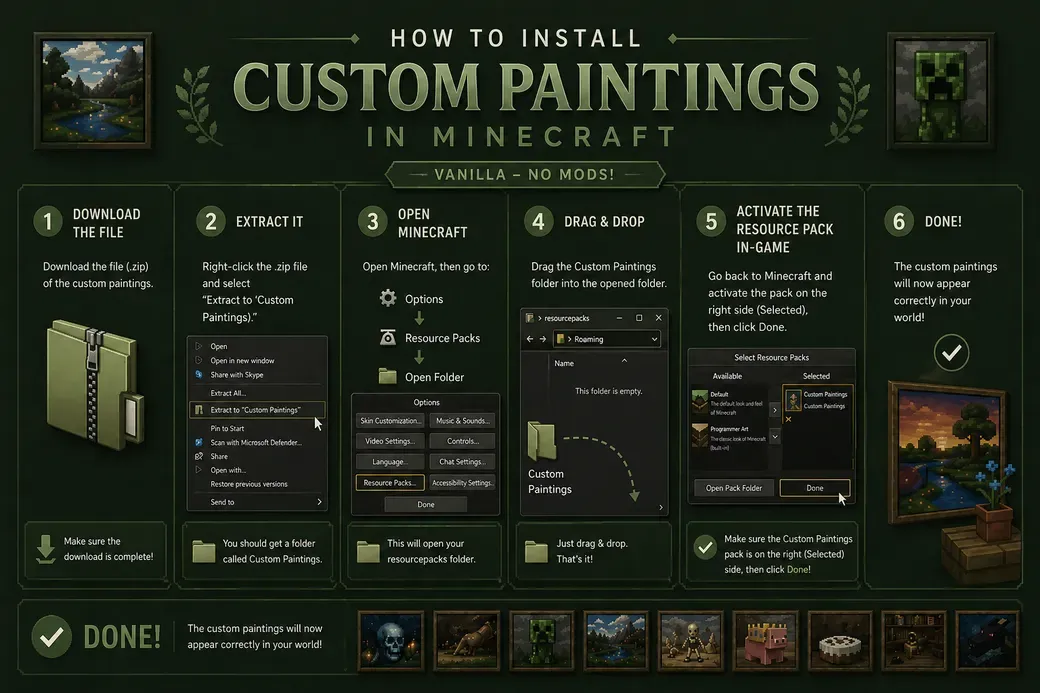
This guide explains how to install custom paintings in Minecraft using a resource pack, without requiring any mods.
After downloading the file, make sure it is in .zip format and not already extracted. Right-click the file and select “Extract in [file name]” to create a folder with the same name.
Once extracted, open Minecraft and navigate to Options → Resource Packs → Open Pack Folder. This will open the folder where all resource packs are stored.
Drag and drop the extracted folder (not the .zip file) into this directory. Then go back to the game and activate the resource pack by moving it to the selected column.
After applying the pack, your custom paintings will automatically replace the default ones in-game.
If the paintings do not appear correctly, make sure the resource pack is compatible with your Minecraft version and try restarting the game.
Bringing the Full Experience to Life
Designed as Part of the Experience
Custom paintings are often integrated into my builds to enhance atmosphere, storytelling, and overall detail. This tutorial ensures you can view these projects exactly as intended, with every element correctly displayed.