Unlocking SaaS Product Growth

Insights and strategies to drive B2B and B2B2C SaaS success through 0-1 product, Tech partnerships and ecosystems, and AI innovation, leveraging 15+ years of industry expertise.

Why Your AI Agent Demos Don't Survive Production

Most agents don’t fail at the prototype phase. They fail in production. I’ve shipped AI products at Microsoft, Passport Labs, Wells Fargo lab across B2X SaaS — and the same pattern shows up every time. A demo wows the room. Then the agent hits a real CRM, tries to update a live ticket, searches a secure file system — and falls apart. It confidently says it has done the part, but the artifact is nowhere to be found, which is what I commonly saw with the Microsoft Co-Pilot in M365 apps, too. Here’s what I’ve learned about what actually separates a demo from a production-worthy system. Not Every Workflow Should Be Agentic Before anything else, you need to be honest with yourself about use-case fit. Great candidates: multi-step automation with clear success criteria, deterministic flows, tool-driven tasks, low blast radius. Think ticket triage → fix, API data sync, document extraction → validate → update. Bad candidates: irreversible actions, high-stakes decisions, anything requiring tacit expertise. I tried applying agents to complex legal and clinical judgment tasks (GDPR, RFI workflows) — we had to narrow the scope to sub-use cases before it was usable. The question isn’t “can an agent do this?” It’s “can we measure whether it did it correctly?” Evals Are the Product This is the hardest mindset shift for most teams. Evals and monitoring aren’t something you add before launch — they are the product. Think through the eval stack: Accuracy — task success rate, precision/recall for extraction Reliability — MTBF, tool call error rate Latency — p50/p95/p99 response times Cost — $ per completed task Safety — policy violation rate, unsafe action count Drift — input distribution shift, embedding mismatch Trust — user satisfaction, override rate by human operators Each one maps directly to an architectural decision you made earlier — planner logic, tool schema, memory strategy, safety layer. If you haven’t defined pass/fail for each layer, you’re flying blind. When to Use Autonomy vs. LLM Judge vs. Human-in-the-Loop This is where teams waste the most time debating instead of deciding. Here’s my rule of thumb: In practice? Most production systems use dual-review — LLM judges handle the high-volume, low-risk checks while human reviewers focus on high-risk or high-ambiguity cases where liability or domain expertise actually matters. The Failure Modes No One Talks About I’ve been building long enough to have hit all of these. Ambiguous user inputs are more dangerous than they look. A support agent sees: “This is not working, fix it.” → The agent tries multiple tools, retries, reasoning trace balloons, and token costs spike. Vague inputs are one of the most common paths to cascading failure. I have seen it blow up my N8N tokens in a single session! Upstream API failures compound fast. When rolling out an M365 Cloud Storage and collaboration project past beta at one of the B2B Collaboration Platforms, as a Principal Tech PM, 3rd-party API slowness caused data corruption and rising customer issues. We caught it early in Beta as Security and data sovereignty were first core principles — but at scale, you need fault tolerance baked in from the start, not bolted on, and it requires holistic treatment from infrastructure, orchestration, to application and UX layer, alongside active health checks with the Partner services. Multi-agent coordination is the hardest thing to debug. I see it constantly — in n8n, in Cursor, even in Co-pilot, in production systems. Agents stepping on each other’s state, conflicting tool calls, infinite delegation loops (”Agent A asks Agent B who asks Agent A...”), confidently saying something is done, with no artifacts to be found anywhere. Even when all the APIs are healthy, coordination failure is a top-tier reliability risk - apparently, Co-Pilot, in one case, admitted after 3 tries, that it doesn’t have write access to M365 apps and can’t do certain things which it said it did before. Dataset drift is sneaky. In my experience with MLOps at Wells Fargo’s Innovation Lab, upstream credit/merchant data changes caused models to drift in two ways: unforeseen parameters affecting model weights (requiring fine-tuning) and data staleness (more manageable with RAG and regular updates). The first is expensive. The second is survivable if you plan for it. BTW, MLOps experience with data and model monitoring does translate to LLMops, which is still an evolving field. Monitoring Is Not Optional Once you’re in production, you need: Product metrics: task success rate, policy violation count, data drift signals Engineering metrics: tool error rate, confidence vs. accuracy calibration gap, latency p99 Business metrics: cost per session, cost per 1K tokens, API spend And governance isn’t bureaucracy — it’s structured telemetry, replay/rollback support, audit logs, and alerting rules tied to safety, cost, and performance thresholds. If you don’t have trace IDs and input snapshots, you can’t do post-mortems. I also advocate to treat UI and the app layer, and establishing trust with the key foundation of CX thinking. Apply first principles - transparency and clarity around what the agent can do, can’t do, showing proof-point on how it reasoned, or even citations, and in one of the procurement flows, the client challenged us on our open source LLM models, and how we delivered better than generic models like ChatGPT, we showed side-by-side comparison across key dimensions. The Framing I Use Think in Agentic PDLC terms: design → evals → monitoring → rollout → governance. Roll out deliberately: internal alpha → controlled beta → gradual ramp → full launch. Watch canary signals — safety violations, task-success deltas, user-friction spikes. According to Deloitte’s 2025 Tech Trends report, only 1 in 10 organizations has agents in production. 38% are still running pilots. The gap between those groups is almost always about evaluation discipline, not model capability. Robust evals aren’t a nice-to-have. They’re what reduces rollback cost, catches failure modes early, and lets you scale without incident. If you’re building agentic systems and want to compare notes, I’m happy to dig into specifics — drop a comment or reach out directly.
Maximizing Growth: A Step-by-Step Guide to Building Strategic Partnerships for B2B SaaS

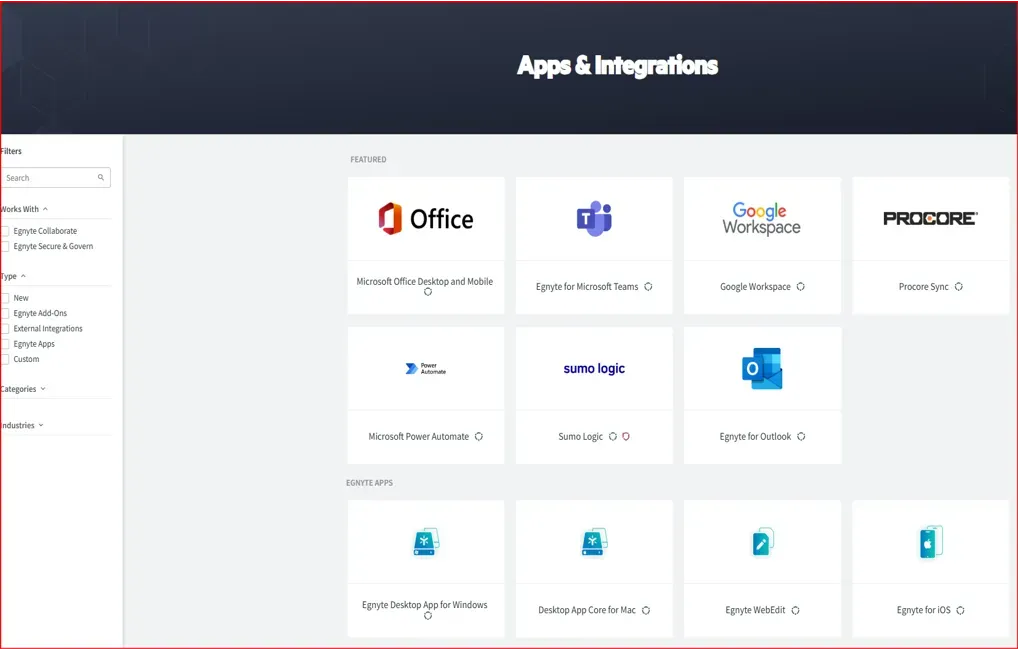
Strategic partnerships are one of the most powerful — and most misused — growth levers in B2B SaaS. Here's how to do them right. I was recently on a panel with SaaS Alliance talking about product and platform partnerships, and one theme kept surfacing: teams are still building integrations based on gut feel or what sounds strategically impressive, not what customers actually need. I've seen this play out at Microsoft, Egnyte, and Passport Labs, and across every SaaS product I've worked on since. The pattern is always the same. A partner looks exciting, someone in leadership says "we should integrate with them," three months later adoption is flat, and the engineering team has moved on to the next shiny thing. Strategic partnerships can accelerate distribution, unlock new customer segments, and deepen retention — but only when they're built on the right foundation. Here is the process I actually use. Step 1: Align on Charter Before You Talk to Anyone The fastest way to waste six months on a partnership is to start with capabilities instead of context. Before a single partner conversation begins, your team needs a clear, bounded answer to three questions: What business outcome is this partnership meant to drive — new pipeline, retention, expansion, product gap, market entry? What does winning look like for both sides — not just yours? What are we explicitly not trying to do here? At Egnyte, when I led cloud storage and app partnerships, we operated from a clear belief: enterprise content workflows don't live in a single product. Our charter wasn't "partner with everyone" — it was to remove the friction points where customers had to leave Egnyte to get work done, and to own the integrations that mattered most to the verticals we were targeting. That focus prevented us from chasing every inbound partnership request that came through the door. Alignment on charter is the prerequisite. Without it, you're not building a partnership — you're building a dependency you'll eventually have to unwind. Step 2: Start With Your Existing Customers, Not Your Competitor's Marketplace The most common mistake I see is starting the integration research with a competitor scan. That's the second step, not the first. Your existing customers are already telling you what they need — most of the time, you're just not listening systematically. Before you look outward, look inward: What tools do your customers already have in their stack, and why? Where are they doing manual work that your product should be automating? Where does your product drop them off into a context switch they didn't choose? What comes up repeatedly in sales calls as a reason deals stall or close late? I ran customer surveys — and used existing data from sales conversations in Gong and support tickets — before making any significant platform decision across Microsoft, Egnyte, and Passport Labs. The signal is always in the data you already have. At Passport Labs, curb management and IoT partnerships followed the same logic: customers weren't asking for more integrations broadly — they were blocked on specific workflow gaps in billing and were frustrated with the fragmentation, dealing with multiple app and vendors. That directed us toward Turnstone Data Labs, an ML company building occupancy models for smart cities, rather than a broader and less targeted partner sweep while partnering with the Consumer app companies with on-street inventory and Passports Payment rails, to drive data and distribution strategy. Not. customers didn't ask for the occupancy solution, but efficiency and streamlining operations with multiple vendors, but you think one step ahead - what you will do with data you have now, that's your moat and what more you can do to deliver value? What you can build, partner, and buy of shelf? It's also not a one-time exercise. Each stage of product and partnership development should follow with more quantitative validation — usage data, user testing, activation analysis — to pressure-test assumptions before you commit engineering resources. And second stage to drive MVP to prove joint OKRs and value with actual pilot customer, let's say within a quarter to see if there is value, and clear ROI and potential. Step 3: Then Look at Competitor Ecosystems Once you know what your customers are telling you, layer in competitive intelligence. Look at what integrations your competitors have already built — their marketplaces, app directories, and partner pages. If three or four competitors all support the same integration, that's a market signal. It doesn't mean you copy it blindly, but it tells you the workflow problem is real and validated. The framework I've used since my Egnyte days and still apply today: map your own product's competitive position first, then determine where the gaps are between what competitors offer and what your customers say they need. Those gaps are your highest-priority white space. At Egnyte, M365 and Google Workspace integrations were table stakes — 99% of enterprises already had them bundled. Competitors like Box and Dropbox had the same. So the question wasn't whether to build those integrations — it was how to find the wedge: where Egnyte could complement the productivity suite in ways our competitors couldn't, specifically for the compliance-heavy verticals we served best and for front-line workers in Vertical SaaS we specialized in - construction tech for example. Breadth gets you in the door. Depth and breaking new ground and 0-1 differentiation is what drives retention and brand. Step 4: Prioritize by Workflow Friction, Not always by Brand Name Not all integrations are equal — and the most recognized brand isn't always the most strategic partner. How I think about prioritization depends on where the company is in its platform journey: If you're bootstrapping a new ecosystem , logos and breadth matter. Getting anchor integrations live signals market credibility to buyers and investors. If you're scaling an existing ecosystem , depth matters more than breadth. Find the nimble partner who shares your customers, your vision, and your urgency to execute. Across both stages, I ask three questions to pressure-test every integration candidate: 1. Does this remove major workflow friction? If a customer has to manually export data from your product and import it somewhere else every day, that's an integration worth building. If it saves two clicks a month, it's not. 2. Does this help sales close deals faster? Integrations that surface repeatedly in sales calls deserve a separate tracking process. When a prospect says "we need this to work with [X] before we can sign" — that's not a feature request. That's a revenue signal. 3. Does this unlock a new customer segment? Sometimes the right integration opens a door to a buyer you couldn't reach before — a new vertical, a new company size, a new channel. That's strategic value beyond workflow efficiency. Step 5: Build the Feedback Loop Across Teams One of the questions that got the most discussion on the panel: how do you ensure other departments are actually feeding you data for prioritization? My honest answer: you have to build the process deliberately, or it won't happen. Sales needs a lightweight way to log integration blockers in deals — not a 10-field form, just a tag or a note in the CRM. Customer success needs a channel to escalate workflow friction they're hearing on calls. Support tickets need regular review for integration-adjacent issues. None of this is technically complicated. What makes it hard is that product teams often treat it as optional, and then wonder why prioritization feels like guesswork. As a leader, getting cross-functional buy-in requires consistent advocacy — not just one kickoff meeting. Build the process, reinforce it, and tie it to outcomes the other teams already care about. Step 6: Build the Integration Ladder Strong platform products evolve integrations in deliberate stages. Trying to build Stage 3 before Stage 1 is stable is one of the most common ways integration programs collapse. Stage 1 — Foundation API access, basic data sync, authentication. Get this right before anything else. Stage 2 — Workflow Triggers, automation, webhooks. This is where integrations start delivering recurring value in users' daily work. Stage 3 — Ecosystem Marketplace apps, developer platform, third-party extensions, joint solutions with strategic partners. This is how companies like Slack, Shopify, and Notion built compounding network effects. Each stage requires a different internal investment model — and a different kind of partner relationship. Be honest about which stage you're actually in. Step 7: Validate Before You Build This sounds obvious. It almost never happens consistently in practice. Talk to customers before scoping the build, not after Track integration feature requests over time — and chase the why , not just the volume Run discovery with prospects who are actively blocked on an integration — their urgency will tell you more than a survey Analyze usage data for workflow drop-off signals before assuming you know where the friction is Strategic integrations require dedicated resources — internal and external — and they don't come free. Validating demand before committing engineering time is the discipline that separates platform teams that scale from those that accumulate technical debt in the form of underused connectors. Step 8: Measure What Matters After Launch The launch is not the finish line. After building an integration, the metrics that tell the real story are: Activation rate — are customers who have access actually turning it on? Workflow usage — are they using it regularly, or once and never again? Retention impact — does integration usage correlate with lower churn? Expansion revenue — does it open upsell or cross-sell motion? Sometimes the most requested integration is not the most used. After driving awareness through in-product surfaces (I've used Pendo.io effectively for this), CSM outreach, and PMM campaigns — if adoption still doesn't follow, be prepared to sunset it. A long list of connectors nobody uses is a liability, not an asset. The goal isn't the integration. It's adoption, engagement, and retention — treated as a portfolio that moves you toward platform-level stickiness. The Principle Underneath All of It The best partnership strategy isn't the one with the longest list of partners or the most recognizable logos. It's the one built on the clearest understanding of what your customers are actually trying to accomplish — and a disciplined plan to remove the friction standing between them and that outcome. Build trust and transparency with partners from the start. Invest in shared resources: co-branded materials, integrated demos, joint success metrics. Communicate regularly and run performance reviews that keep both sides accountable to outcomes, not just activity. A great integration doesn't feel like an integration. It also doesn't end with one integration point and charter. Its more than vendor management, is strategic and long-term and you do end up doing better things along the way even though you start small, just like land and expand SaaS model.

The Partnership Playbook No One Teaches You: What I Learned Building Skype Mobile Into 10+ Devices

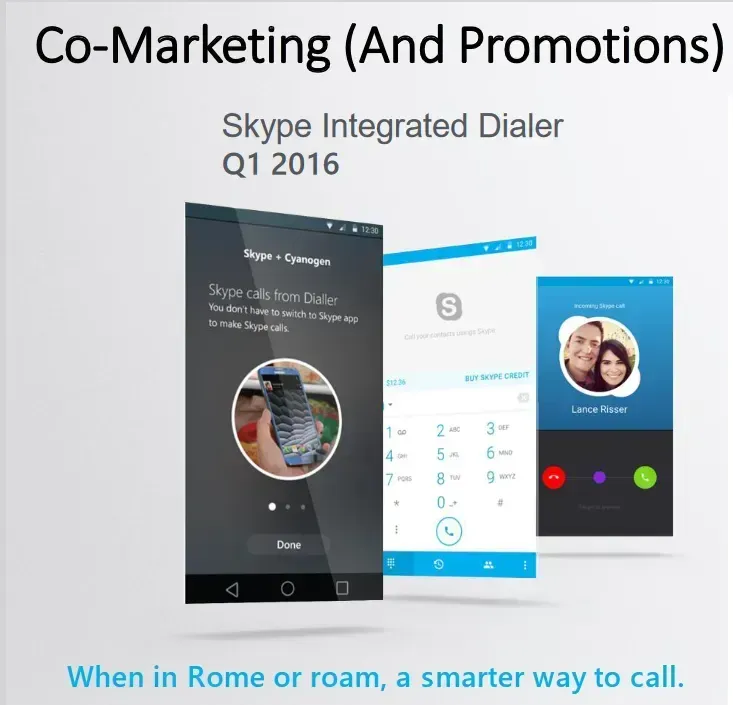
A great integration isn't about the API. It's about finding the white space where both sides win. I've led product integrations at Microsoft, Egnyte, and across B2B SaaS — and the most common mistake I see isn't technical. It's strategic. Teams jump straight to "what can we build together?" before they've answered "why does this partnership exist, and for whom?" This is the framework I've built and refined across years of doing this work. It's grounded in one of the most complex integration plays I've run: embedding Skype natively into Cyanogen OS devices to compete in emerging markets against Google GMS apps and Apple iOS — simultaneously. Before You Build, Align on Your Charter The fastest way to waste six months on an integration is to start with capabilities instead of context. When I headed the Skype Product Growth and Integrations team, we operated from a core belief: the next generation of applications would not live in silos. Systems and apps had to work seamlessly together — removing friction, creating value at the intersection. But that belief alone wasn't a strategy. Before a single line of API work began, we had to answer: what is the specific white space we're entering, and what does winning look like for Skype and our partners? Our charter was clear and bounded: Increase Skype awareness and engagement through mobile partnerships in growth markets Drive Android adoption through deeper OS-level integration — not just app distribution That focus prevented us from chasing every shiny co-build opportunity. Alignment on charter is the prerequisite. Without it, you're not building a partnership — you're building a dependency. Start With Your Existing Customers, Not Your Partner's Pitch Deck The most common mistake I see in integration work is skipping customer discovery entirely and going straight to partner workshops. You'll end up with a technically impressive integration that nobody asked for. Before we looked outward, we asked our users directly: What apps are already in their stack, and why do they use or avoid certain ones? What are their real motivations for using Skype — brand, privacy, cost? Where does our product drop them into a context switch they didn't want? What frustrations do they have with native apps or competing OTT products? Survey responses via community channels and partner social gave us 100+ answers, and three clear themes emerged: Users wanted privacy and security — WhatsApp's noise was a real friction point The dialer was the first thing they reached for , but calling plans weren't competitive They wanted an open, cross-platform ecosystem — not locked into iOS That insight directly shaped our integration strategy with Cyanogen OS — a growing startup whose value proposition was "give users a choice," built on an open-source ROM community that was gaining traction in exactly the markets we wanted to enter. The customer signal told us where to go. The partner capability told us how to get there. Map the White Space Before You Write the Roadmap Once you have customer insight, the next step is competitive positioning — not feature comparison. The framework I've used consistently: map your product's competitive strengths, then identify the gaps between what competitors offer and what customers actually need. Those gaps are your highest-priority white space. For Skype in emerging markets, the opportunity was specific: WiFi-first spontaneous communication in markets with high international call volume, unstable network conditions, and a strong cultural habit of voice calling. Native dialers were the default behavior. OTT apps were an afterthought. The white space wasn't "make Skype available on more Android devices." It was: build a calling experience inside the dialer itself — the way Apple had done with FaceTime, but across Mobile, Desktop, and Web, and not locked to a single OS. That reframe changed everything about the technical architecture and the partner ask. Strategy Is Not Enough — Lead the Joint Roadmap Here is where the rubber meets the road. Customer discovery and white space analysis are necessary, but if you can't execute jointly, customers never see the value. For the Skype-Cyanogen integration, execution meant: 50+ iterations of joint UX developed together, not thrown over the wall Partner APIs for voice and video calling built in parallel with the UX work A Mobile SHIM (SDK) designed specifically for the connectivity realities of emerging markets — low footprint, resilient to unstable networks Cloud infrastructure to support OTA (over-the-air) updates without bloating the app Cyanogen owned the OS-level signals and the native app layer implementation. We owned the calling infrastructure, the PSTN trunking, and the video escalation experience. The division of ownership was explicit — not assumed. The product journey covered every stage: how users discover the new experience on first device setup (OOBE), how they land their first "aha" moment seeing Skype contacts built into the phone dialer, how a regular call escalates to video seamlessly — a FaceTime-equivalent experience, but platform-agnostic. Each UX stage was validated quantitatively through user testing before we moved forward. We announced at Mobile World Congress with strong early metrics: 44% DAU/MAU on calling — a real signal of product-market fit, not a vanity launch. Watch the Data, Scale Slowly, Iterate Relentlessly The launch was not the finish line. Shortly after the MWC demo, we identified a core activation problem: Skype was on the device, but users didn't know when or why to open it. An app sitting dormant among 50 others isn't delivering value — to the user or to us. The solution came from combining OS-level signals from Cyanogen with Microsoft's Azure ECS service. We built contextual nudges that surfaced Skype exactly when it was relevant: when a user was placing an international call, when they were roaming, when Skype could save them real money. We watched the guardrail metric — uninstall rate — to make sure we were adding value, not noise. The same ECS service powered A/B testing on nudge messaging and handled localization without bloating the SHIM with language packs. We scaled to 10+ OEM devices and launched across APAC markets from that foundation. The Three Things That Made It Work Looking back, three values drove the outcome: Reach — meeting users inside the dialer they already used, not asking them to find us. Frictionless — building the experience at the OS level, not as another OTT app competing for attention. Value-added — solving a real problem (cost, cross-platform access, call quality) at exactly the moment users felt it. Those three aren't specific to Skype or to mobile. I've applied the same lens to integration strategy in B2B SaaS, platform partnerships, and enterprise distribution. The context changes. The discipline doesn't. What I'd Tell Any PM Starting an Integration Today Define the charter, goals, align before you define the API. Talk and understand your customers before you talk to your partner's BD team. Find the white space where your strengths meet their distribution and their users' unmet needs. Then own the joint roadmap — not just your side of it. A great integration doesn't feel like an integration. It feels like the product was always supposed to work that way.

Behind the Scenes: Crafting Scalable Platform and Multichannel Applications for SaaS Platforms

Building for multiple channels isn't a technical challenge first. It's a product strategy challenge. Across my work at Microsoft, Egnyte, Passport Labs, and now through Gradient Advisory — one pattern holds across every platform build I've been part of: teams that treat multichannel as an engineering problem from the start almost always end up rebuilding it. The ones that get it right start with a clear picture of who they're building for, what those users are actually trying to accomplish, and only then figure out which channels need to exist and how they should connect. Here's how I think about it. Start With the Job to Be Done — Not the Channel List Before deciding whether you need a web app, a mobile experience, a voice interface, or all three — you need to understand the job your customer is trying to do, and where in their workflow they're trying to do it. This isn't abstract. At Runara.ai (formerly AllyIn.ai ), where I worked with the founding team on early product strategy, the ICP included data center professionals, supply chain operators, and procurement teams managing AI infrastructure. These aren't personas who sit at a desk refreshing a dashboard all day. They're in the field, context-switching constantly, needing information surfaced at the right moment in the right format. That insight shaped the entire interaction framework — before a single line of code. It told us that a web-only experience would underserve the use case, that a conversational layer wasn't a nice-to-have, and that the channel architecture had to support both structured data views and natural language queries depending on context. Define the job to be done first. The channel decisions follow once initial product is ready. Build the Interaction Framework Before the Feature List Once you understand the user's job and environment, the next step is mapping the interaction architecture — what I call the IA layer: how users move through the product across stages, what each stage needs to accomplish, and where friction is most costly. For Runara, working with the CTO, we designed a staged journey: Discovery and onboarding — how does a data center operator or procurement lead land in the product and orient quickly without a manual? Core workflow — what does the daily or weekly usage loop look like for their specific role? Escalation and exception handling — when something goes wrong at the inference layer or cost threshold, how does the product surface that signal and guide action? Layering an agentic and conversational interface on top of that structured journey — using LLMs, RAG pipelines, and voice capabilities via ElevenLabs — only worked because the underlying interaction framework was already clear. The AI layer amplified the experience; it didn't substitute for thinking through the UX fundamentals. This sequencing matters. Multimodal and agentic features built on top of an unclear IA create confusion at scale. Platform Architecture Has to Match the Go-to-Market Reality Technical architecture decisions and GTM decisions are not separate conversations. They need to happen in parallel. At Egnyte, building cloud storage and collaboration integrations for enterprise customers meant the platform had to be reliable enough to support M365 and Google Workspace workflows that 99% of enterprise users depend on daily. Latency, uptime, and data residency weren't just engineering concerns — they were sales blockers or enablers depending on whether we got them right. At Passport Labs, IoT and curb management integrations meant dealing with real-time data streams from physical infrastructure. The architecture had to handle intermittent connectivity, edge processing, and multi-system orchestration — and that directly shaped which ISV partnerships were viable and which weren't. The principle is consistent: your cloud infrastructure strategy, your API design, and your native integration decisions, evals or realiability, security should all be grounded in the specific reliability and performance bar your target customers require — not a generic "scalable architecture" aspiration. AI/ML Integration Needs a Clear Value Hypothesis Adding AI and ML to a SaaS platform is not a differentiation strategy on its own. The question is always: what specific decision or workflow does this make faster, more accurate, or less effortful for the user? At Runara, the value hypothesis was concrete: real-time telemetry and intelligent orchestration to reduce AI inference costs and surface performance anomalies before they compound. That's a measurable outcome. It gave the product team a clear test for every AI feature — does this move that needle, or is it capability for its own sake? The integrations that drove real engagement were the ones tied directly to that hypothesis: inference cost visibility, drift alerts, and model performance comparisons surfaced in the workflow where operators actually make decisions. AI/ML earns its place in a platform when it's anchored to a specific, testable value hypothesis. Without that, it becomes the most expensive way to add complexity. Close the Loop: Agile, Post-Launch, and the ARR Connection Product strategy doesn't end at launch. The builds I've seen scale successfully all had one thing in common: a structured feedback loop that connected post-launch usage data directly back to product and partnership decisions. In practice, that means: Activation and workflow metrics — not just DAU/MAU, but are users completing the core job the product was designed for? Feedback channels across CS, sales, and support — systematically fed into a product iteration cycle, not collected and forgotten Partner and channel signals — are integration partners seeing adoption? Where are the handoffs breaking down? At Runara, this loop informed both the product roadmap and the GTM positioning. Customer and channel feedback shaped which use cases to lead with in partner conversations, which in turn influenced which integrations to prioritize next. The cycle between product iteration and ARR growth only works when the feedback infrastructure is built deliberately — not assembled after the fact. What This Looks Like in Practice Stepping back, the through-line across every multichannel platform build I've worked on is this: User clarity → Interaction framework → Architecture decisions → AI/ML with a clear hypothesis → Post-launch feedback loop Each stage depends on the one before it. Skipping steps doesn't accelerate the build — it creates rework. The platforms that scale aren't necessarily the ones with the most channels or the most integrations. They're the ones where every channel decision, every integration, and every AI feature traces back to a clear picture of what the customer is trying to do — and a disciplined process for measuring whether you helped them do it. If you're working through a multichannel platform build or evaluating your AI integration strategy, I'm happy to compare notes — drop a comment or reach out directly.